

While studying at Aquinas there will be times when you will need to find good, quality information to use in your assignments, supporting your arguments with evidence from experts. You will also find that using good, quality information in your independent study will help you to develop your knowledge of your subjects.
There is so much information available to you that it can be hard to know where to start. Your first thought may be to use Google Search. While lots of information can be found by searching the web, for college work the information you need to use has to be good quality, trusted, academic information. So, before you use the web we recommend that you first use resources provided by the library.
Use the library catalogue
The catalogue will help you to find quality resources that you can trust.
What is the Library Catalogue?
Our library catalogue contains a record of all of the items available through the Aquinas Library. Using our online catalogue is a great way to find out what resources we have, including books, ebooks, journals, ejournals, and more. You can also reserve items and view or renew your current loans.
How can I access the catalogue?
You can access our catalogue using dedicated PCs in the Learning Centre or online using the link in the navigation bar above.
How can I search the catalogue?
There are various ways to search our catalogue.
- Use the main search box when you know the title of the resource you want or for a general topic search to see what is available.
- Use the ‘Advanced Search’ to refine or narrow your search based on specific criteria, enabling you to focus in more precisely on what you need.
How can I find an item in the Library?
Items on our library shelves are arranged in order by classification number. Each item on the library shelves has a classification number, which acts like an address, telling you where on the library shelves the item is located.
To find an item on the shelf, first search for the item in our catalogue. From the list of search results select the item you are looking for. The dialogue box will contain an image of the item, the author, whether the item is available, its title, classification number, along with other information.
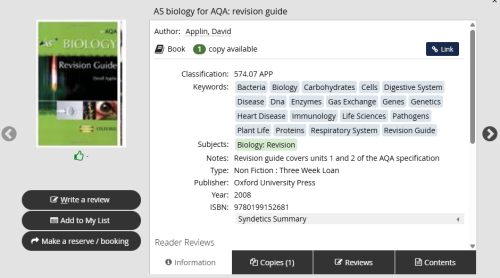
Make a note of the classification number to help you find the item on the shelves.
So what does the classification number mean and how does this help you locate the item on the shelves? To organise items on the shelves we use a system known as the Dewey Decimal Classification System, where an item is allocated a number based on its subject. The 10 broad subject groups are:
- 000 – Computer Science, Information and General Works
- 100 – Philosophy and Psychology
- 200 – Religion
- 300 – Social Sciences
- 400 – Language
- 500 – Science
- 600 – Technology (Applied Sciences)
- 700 – Arts and Recreation
- 800 – Literature
- 900 – History and Geography
These subject areas are very broad, so items are given more specific numbers based on topic. Let’s use the catalogue example above to break this down:
What does classification 574.07 APP mean?
- The first digit in the three digit number indicates the broad subject, e.g. 500 is Natural Sciences.
- The second number indicates the specific area within the main subject, e.g. 570 is Biology.
- The third number indicates the topic within the specific subject area, e.g. 574 is specific physiological systems in animals.
- The numbers after the decimal point indicate the sub-topic covered, e.g. 574.07 is the study and teaching of Biology.
But why are there letters after the number? This is to differentiate between items that are about the same subject but written by different authors. The three letters are the first three letters of the author’s surname. In this example APP refers to the author David Applin.
Resources are arranged on the shelves in number order. Those items with the same number are then further arranged in alphabetical order.
To find an item on the shelves first use the labels on the end of the shelves, which will tell you which classification numbers are held on those shelves. Then follow the numbers and letters on the label of each item to find the specific item you want.
Remember, you can also ask a member of the Library Services Team for help.
 Aquinas College Library
You must be logged in to post a comment.